ITRS Product Support
Everything you need to open a ticket, reach our teams, and get your issues resolved faster.
Everything you need to open a ticket, reach our teams, and get your issues resolved faster.
At ITRS, our goal is simple: keep your monitoring stable, performant, and business-critical systems running smoothly.
Here's what you can expect when working with us - who can access support, what we cover, and how we collaborate with you.
Support is available to all clients with an active maintenance or subscription agreement.
To ensure security and compliance:
Once registered, users can:
Any internal restrictions around downloads or deployments remain the responsibility of the client organisation.
ITRS operates a structured Level 1 → Level 2 technical support model.
Your first point of contact:
Escalated cases are handled by experienced product specialists with deeper technical expertise.
As investigations progress, tickets may move between engineers to ensure the right skillset is applied at the right time.
Our approach is collaborative, transparent, and focused on resolution.
We support all queries relating directly to ITRS products and services, including:
We expect users to have a working level of technical knowledge of:
This helps us work efficiently together and accelerate resolution.
To keep our service focused and effective, certain areas fall outside standard support scope:
While many of our engineers have broad technical expertise (sysadmins, DBAs, market data specialists, dashboard experts), our primary responsibility is supporting ITRS products.
That said, where appropriate and capacity allows, we may offer guidance on a best endeavours basis to help you progress - particularly where an issue interacts with ITRS software. Any such assistance is advisory and remains outside the formal scope of product support.
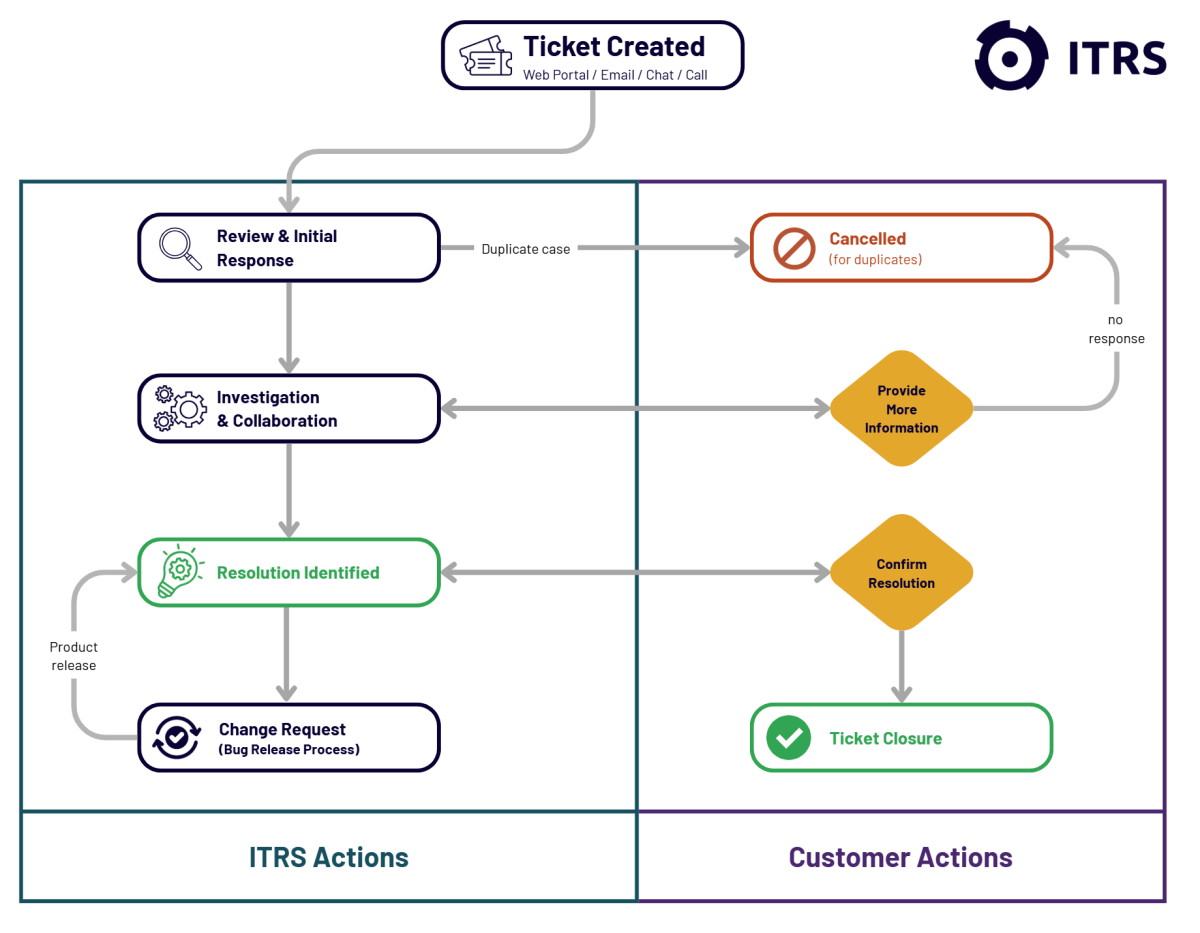
Once raised, your ticket enters a structured workflow:
If we request information and receive no response for two weeks, the ticket will automatically close after reminder notifications.
Duplicate tickets may be cancelled to maintain clarity and efficiency.
Cases are prioritised based on business impact, using the following model:
| Severity | Definition / Conditions |
|---|---|
| Severity 1 - Severely Impacted |
|
| Severity 2 - Limited Capabilities |
|
| Severity 3 - Minor Issue |
|
| Severity 4 - General Enquiry |
|
Our engineers may adjust severity based on the information provided. If you believe the severity should change, simply provide business justification and we'll reassess.
For enhancement requests:
These updates generate informational tickets that close automatically.
For confirmed bugs:
When a new client is activated:
This ensures a seamless transition into supported status.
We aim to be flexible and practical in our collaboration:
For complex or urgent issues, remote sessions may be scheduled at the discretion of our technical team.
In addition to direct support, clients have access to:
We encourage customers to make full use of these resources to accelerate troubleshooting and learning.
After ticket closure, you'll receive a short feedback survey.
We genuinely use this input to improve our service. Past improvements driven by customer feedback include:
Your feedback directly shapes our service evolution.
We are committed to:
ITRS Support exists to protect your operational resilience — and we take that responsibility seriously.
ITRS Product Support operates globally and provides 24x7 support to ensure assistance is available whenever you need it.
We offer multiple support channels to make it easy for you to get help.
You can contact ITRS Client Services through any of the following channels:
Submit and manage support requests via our portal: https://support.itrsgroup.com
All portal submissions automatically create a ticket in our global ticketing system.
Use the chat function available on all ITRS Group websites for quick queries.
Chat interactions will also generate a support ticket where necessary.
Send your request to: support@itrsgroup.com
An email ticket will automatically be created in our ticketing system.
If you prefer to speak directly with our team, please contact one of our global support numbers:
Weekend and public holiday telephone support is available exclusively to customers with a Premium Service subscription.
+44 808 168 8236
+1 844 507 4047
Once a ticket is raised (via any channel):
Users can create an account in the ITRS Support Portal to gain full access to support services.
Registered users can:
Follow this guide to create an account: How to create a support account
As a global organisation, ITRS uses English as its principal language for both internal and external communications.
While many of our team members are multilingual, we kindly ask that all support interactions are conducted in English. This ensures we can provide you with the broadest and most efficient coverage.